How to use DistilCode
 DistilCodeBack to home
How to use it
DistilCode is a coding agent that runs in your terminal. Install it once, start it inside a project, and it reads files, edits code and runs commands for you — while keeping the context it sends small, so every task costs less.Getting started
- 01
Install DistilCode
Install or update the CLI, then open a new terminal so it picks up your PATH. On Windows, run the installer; on macOS and Linux, copy the command below.
See all platform downloads →curl -fsSL https://www.distilcode.dev/install | bash - 02
Start a session
Open DistilCode inside your project. It starts in the current folder — pass a path to open another — and the interactive session takes it from there.
distil
Control Panel
Tune how the agent works.
The Control Panel sits at the bottom of the right sidebar — pressctrl+o to switch to it. Every option is a toggle you flip from there, grouped by what it changes.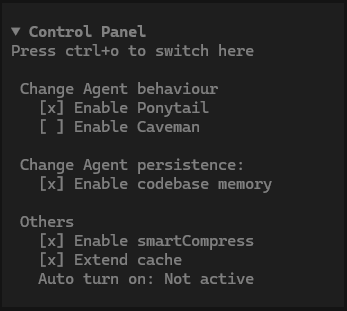
Change agent behaviour
- Ponytail
- Full-intensity efficiency: reuse existing code, the standard library and native features before writing the minimum that works. On by default for main agents — say “stop ponytail” or “normal mode” to stop.
- Caveman
- Terse answers with no loss of substance. Removes the fluff while keeping code, commands, paths and errors exact. Off by default.
Change agent persistence
- Codebase memory
- Builds persistent repository, module, feature and command knowledge that the main and explore agents reuse across sessions.
Others
- smartCompress
- Lets Jev choose when to compress your context instead of compressing at a fixed point. Saves an additional ~6% in cost.
- Extend cache
- Sends a dummy message just before the prompt cache expires during a tool-call wait, so the cache stays warm.